Family Tree Maker is slow with a large tree
It's almost never your computer. Two settings do most of the damage: background hints and FastFields. Both are on by default. Turn them off in (on a Mac, the Family Tree Maker menu's Preferences), compact the file, and a tree that felt unusable usually feels new again.
- Applies to
- FTM 2024 · 2019 · 2017 · 2014
- Platform
- Windows & Mac
- Time
- ~45 min
- Updated
You don't need to split your tree, and you probably don't need a new computer. Both come up constantly in forum advice, and both are usually premature. The lag comes from work the program is doing that you never asked for: searching online for hints, and searching your whole tree on every keystroke. Stop the unnecessary work and the speed comes back.
How a slow tree shows itself
- Typing that lags behind your fingers, especially in name and place fields.
- A pause of several seconds every time you click a different person.
- The spinning wheel or "not responding" when opening a big view or chart.
- Long waits when the tree first opens, or when saving.
- Everything fine on a small test tree, painful on your real one.
- A tree that used to be fine and has crept slower over a year or two.
What's actually eating the time
These are in the order we'd change them, biggest effect for least effort first. The first two account for most complaints we see, and neither is a fault.
| Cause | What it feels like | Effort | Go to |
|---|---|---|---|
| Background hints Ancestry & FamilySearch lookups |
Pauses when moving between people | 2 minutes | Fix 1 |
| FastFields autocomplete | Typing lags behind you | 2 minutes | Fix 2 |
| Fragmented database indexes | General sluggishness that crept up | 10–40 minutes | Fix 3 |
| Network calls while editing | Stutter during long data-entry sessions | Instant | Fix 4 |
| Oversized media full-resolution scans and phone photos |
Slow media views, very slow syncs | An hour | Fix 5 |
| Duplicate people | Everything slightly slower, file larger than it should be | Varies | Fix 6 |
Fix 1 — Turn off background hints
Biggest single win Stop the constant online lookups
Those little leaf-style hints are Family Tree Maker asking Ancestry and FamilySearch, over and over, whether they hold records for the person you're looking at. Useful when you're hunting records. Expensive when you're trying to type.
-
Open .
-
Clear the checkbox for Show hints from Ancestry.
-
Clear the checkbox for Show hints from FamilySearch.
-
Click OK and carry on working. The difference is usually immediate.
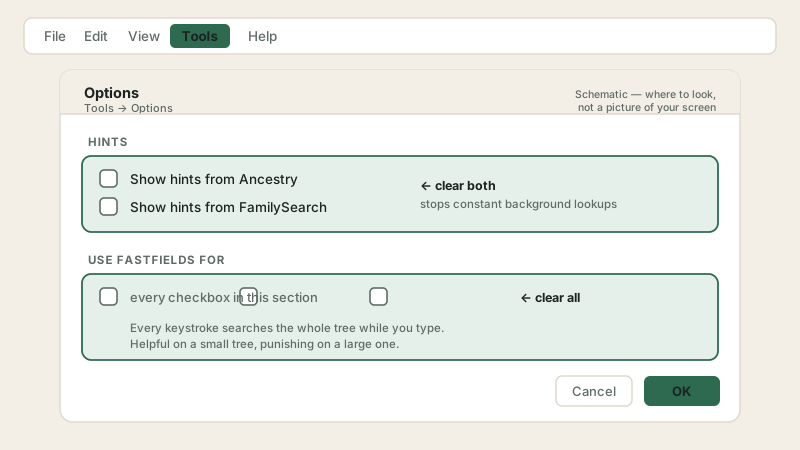
Both problem settings live in the same window, and both are on by default. Schematic. It shows where to look, not a picture of your screen. Layout varies by version.
Your hints are not lost. They're generated and stored by Ancestry, not by your copy of the software. Turn the setting back on whenever you want to sit down and work through hints as a job in its own right, which is a better way to handle them anyway.
Fix 2 — Turn off FastFields
Fixes typing lag The setting almost nobody knows about
FastFields is the autocomplete that offers names, places and sources as you type. To do that, it searches everything already in your tree, on every keystroke. On a small tree you'd never notice. On a tree of thirty thousand people it's the reason your typing arrives half a second late.
-
Still in , find the section headed Use fastfields for.
-
Clear every checkbox in that section: names, places, sources, all of them.
-
Click OK, then type a name into a person's record to feel the difference.
-
You'll lose the autocomplete suggestions. On a large tree most people find that a trade worth making, and you can re-enable one category at a time if you miss a particular one.
Fix 3 — Compact the file
If it crept up slowly Rebuild the database indexes
A tree is a database, and databases fragment. Years of adding, editing, merging and deleting leave indexes in poor shape and space that's allocated but unused. That is the slowness with no obvious starting point. It simply crept up.
-
Close the tree with . The routine won't work on an open tree.
-
Open . If it isn't there, check the menu instead, because the publisher's own documentation places it in different menus for different releases, so the location depends on your version. That inconsistency is why so many people report the option "missing".
-
Select your tree file, tick Perform extended analysis, then click Compact.
-
Repeat until the reduction stops falling, to 0.00% or close to it on FTM 2019 and earlier. FTM 2024 reports 0% on every pass, so there judge by speed. A single pass rarely finishes the job. Full walk-through in the file repair guide.
Fix 4 — Work offline while you edit
For long sessions Cut the network out entirely
Even with hints off, Family Tree Maker checks in with the outside world periodically. For a long evening of data entry, going offline removes that entirely.
-
Open the menu and choose Go Offline.
-
To check it worked, open the File menu again. If it now reads "Go Online", you are offline. The menu shows the action available to you, not your current state, which catches almost everyone out.
-
Do your data entry. Everything saves locally exactly as normal.
-
Go back online when you want to sync or chase hints. Nothing is lost by having been offline.
Fix 5 — Deal with oversized media
The quiet culprit Phone photos and archival scans
Media grows without anyone deciding to let it. A phone photograph of a certificate can be enormous, and a 600 dpi TIFF of a parish register is larger still. Multiply that by a few hundred and the program is dragging a great deal of weight around.
-
Open the media workspace and sort by file size, largest first.
-
Anything unusually large is your target. Save a copy at around 300 dpi as a JPEG, which is ample for genealogy, including for printing.
-
Attach the smaller copy in place of the original and archive the master scan elsewhere. You keep the archival quality; the tree carries a sensible working copy.
-
This also fixes syncs that stall at the same percentage every time. See the sync guide.
Fix 6 — Remove duplicate people
If you've imported A smaller tree is a faster tree
Duplicates inflate the record count, and every operation that walks the tree pays for it. A GEDCOM import from a relative can add thousands of them in one go.
-
Back up first. FTM 2019 and 2024 can roll a merge back through the change log, but that also discards everything you did afterwards.
-
Open and work down from the highest match scores.
-
Full method, and the trap that costs people a generation, in merging duplicate people.
-
Compact the file again afterwards to reclaim the space the merges freed.
TreeVault running in the background
This one is missing from most advice and it resolves cases the other fixes do not touch. TreeVault keeps a continuous cloud copy of your tree, which means it works while you work. On a large tree, and especially where media sits on a network drive rather than the local disk, that background upload competes with everything you are doing.
One researcher with a 20,000-person tree chased lag through every other setting before finding the cause. Disabling TreeVault returned the program to normal speed.
Turn TreeVault off temporarily and use the program for an hour. This is a diagnostic, so nothing is lost by testing it.
Judge the difference honestly. If the lag goes, TreeVault was carrying it, and you can then decide whether the cloud copy is worth the speed.
Check where your media lives. A network drive or NAS multiplies the effect, because every media operation crosses the network twice.
Cancel the subscription if you switch it off for good. It bills whether it runs or not.
Switching TreeVault off removes a backup. Only do it if local backups already protect you. See backing up a tree file before you decide.
If it slowed down the day you upgraded to FTM 2024
Slowness that starts with a new edition rather than a growing tree usually has a hardware answer. FTM 2024 doubled the memory it asks for, and the jump catches Mac users hardest.
| Mac requirement | FTM 2019 | FTM 2024 |
|---|---|---|
| Minimum memory | 2 GB | 4 GB |
| Recommended memory | 4 GB | 8 GB |
| Minimum macOS | Yosemite (10.10) | Big Sur (11) |
| Free disk space | 900 MB | 950 MB |
Read the middle row carefully. A Mac with 4 GB ran FTM 2019 at the recommended level. The same machine runs FTM 2024 at the bare minimum. Nothing is broken, and the software is doing more work with the same memory.
Check your memory before blaming the tree. On a Mac, open the Apple menu and choose About This Mac. On Windows, open Task Manager and read the Performance tab. A machine at or below the minimum needs either more memory or the previous edition.
Restart after installing alongside an older edition. Installers skip files that are locked or in use, and those files finish updating on the next restart. Users who install FTM 2024 beside FTM 2019 and hit days of sluggishness often find it clears itself once the machine has rebooted properly.
Worth saying plainly: users who move from 2019 to 2024 generally report no real change in speed. Persistent slowness after an upgrade points at memory or an incomplete install rather than at the edition itself.
If it's still slow
A tree that's still sluggish after all six is unusual, and normally points somewhere other than Family Tree Maker. Two honest options:
- Check the disk, not the program. A failing or nearly full drive slows every application on the machine. If other programs are also sluggish, the tree isn't your problem.
- Consider splitting the tree, but reluctantly. It's often suggested and rarely worth it. Splitting breaks relationships that cross between the halves, makes charts far harder, and leaves you with several files to back up. Exhaust everything above first.
Still crawling after all that?
We'll go through the settings, the file and the media library with you in one session and tell you honestly where the time is going.
Two habits for anything that takes a while
Compacting a large file, building a cloud copy or restoring one are jobs measured in tens of minutes, and two small things decide whether they finish.
- Stop the computer sleeping. A machine that sleeps for more than about five minutes during a cloud build or restore can cancel the process outright, and it restarts from the beginning rather than resuming. Setting a tree uploading and walking away is how people lose an afternoon to nothing.
- Use a wired connection if you have one. The published guidance is 1 Mbps or better. A tree with heavy media over patchy Wi-Fi is the usual reason an upload never reaches the end.
Keeping it quick
- Leave hints off while you're entering data, and turn them on deliberately when hint-hunting is the task.
- Leave FastFields off once the tree is past a few thousand people.
- Compact twice a year, in the calendar, whether or not anything feels wrong.
- Resize scans before attaching them, not months later.
- Run the duplicate check after every import, while the new people are fresh in your mind.
- Keep the tree on a local drive, never in a cloud-sync folder, which is slow and a leading cause of file damage.
Frequently asked questions
How many people make a Family Tree Maker tree too big?
There's no fixed limit, and person count is rarely the real issue. Trees with tens of thousands of people run well when the settings are right; a two-thousand-person tree can crawl with hints and FastFields on and a media library full of huge scans. Treat it as a configuration question, not a size limit.
Will turning off hints lose my Ancestry record matches?
No. Ancestry generates and stores the hints, so nothing gets deleted. You're only stopping Family Tree Maker from fetching and displaying them continuously while you work. Switch it back on whenever you want to review hints properly.
What are FastFields in Family Tree Maker?
It's the autocomplete that suggests names, places and sources as you type, by searching everything already in your tree. Instant on a small tree. On a large one it runs on every keystroke, which is exactly why typing starts lagging behind your fingers.
Would more memory or a faster computer fix it?
Less than you'd hope. Slowness from hints, FastFields or a fragmented file isn't solved by faster hardware, because the work is unnecessary rather than heavy. Change the settings first, then see where you stand before spending money.
Should I split a large tree into several smaller files?
Last resort only. Splitting breaks relationships crossing between the parts, makes charts and reports much harder, and gives you several files to back up instead of one. The settings, compacting and media steps solve it for most people without dividing the research.
Why did my tree only become slow recently?
Two things creep up quietly: database indexes fragment as you add, edit and delete, which compacting fixes, and media libraries grow without anyone noticing, especially once documents get photographed on a phone at full resolution. Neither has an obvious start date.