Merging duplicate people in Family Tree Maker
Open and Family Tree Maker scores every suspected pair out of 1,000. Merge the 1,000s with confidence; check everything below that by hand. And back up first, because what you can undo afterwards depends on which version you run.
- Applies to
- FTM 2024 · 2019 · 2017 · 2014
- Platform
- Windows & Mac
- Time
- ~1 hour
- Updated
What you can undo depends entirely on your version. FTM 2019 introduced a real safety net called Turn Back Time, a change log holding your last 1,000 actions. FTM 2024 raised that to 5,000. Merges are recorded in it, and the log survives closing and reopening the tree. FTM 2017 and anything older has nothing of the kind, so on those the backup you made beforehand is genuinely your only route back. Even with the log, read the catch below before you lean on it.
Rolling back does not lift out the merge and leave the rest. It returns the tree to how it stood before that action and discards everything you did afterwards. Spot a bad merge straight away and you lose almost nothing. Spot it after an afternoon's work and you choose between the bad merge and the afternoon. That is why the backup step stays in this guide whichever version you run.
Signs your tree has duplicate people
- The same ancestor listed twice in the index, sometimes three times.
- A person with half their sources, because the rest are attached to their double.
- Two versions of one couple, each with some of the children.
- Relationship calculations that come out wrong, because the software sees two separate people.
- Charts with a branch that stops abruptly, then reappears elsewhere.
- A tree whose total person count crept up after every sync or import.
- One edit changing two people at once. You correct your great-grandfather's father, and your great-grandmother's father changes to match. Those are not two records sharing a mistake. They are one record the tree is drawing in two places, which is what a duplicate looks like from the inside. Fix the duplication, not the fact.
Where duplicates come from
Duplicates don't appear on their own — they're created, almost always by one of these. Knowing which applies tells you roughly how many to expect.
| How it happened | Typical scale | How they look |
|---|---|---|
| GEDCOM imported from a relative | Hundreds, sometimes thousands | Whole branches doubled at once |
| Ancestry hints accepted too quickly | A steady trickle | One person at a time, well sourced on both copies |
| Two files merged together | Large | Clustered around the overlap between the trees |
| Same ancestor reached down two branches | A handful | Often genuine pedigree collapse, not an error |
| Manual re-entry after a search failed | Occasional | One copy sparse, the other detailed |
Do this first Back up. This is the one guide where it is non-negotiable
-
Go to and tick include media files.
-
Save it somewhere outside your Family Tree Maker folder, with today's date in the name.
-
Check the file size looks sensible. An 8 KB backup is not a backup. Full detail in backing up properly.
-
Plan to merge in one sitting. A backup that covers the whole session is far easier to reason about than several partial ones.
Step 1 — Open Find Duplicate People
The tool It's in the Edit menu, not Tools
This is the most-missed tool in the program, largely because everyone expects it to live under Tools alongside Compact File. It doesn't.
-
Open your tree, then choose .
-
If you're offered a backup, accept it, even though you've already made one. It costs a minute.
-
Let it finish scanning. On a large tree this takes a while, because it compares every person against every other.
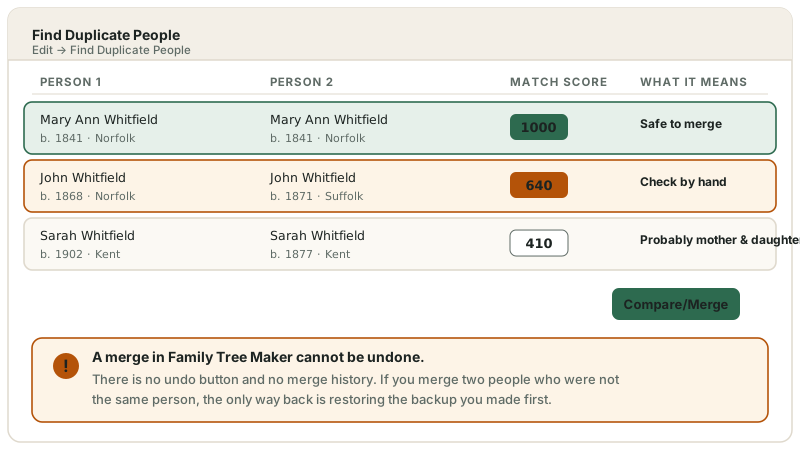
Family Tree Maker lists pairs side by side with a match score. The score is the whole game. Schematic. It shows where to look, not a picture of your screen. Layout varies by version.
Step 2 — Read the match score properly
The bit that matters 1,000 means near-identical
The score is Family Tree Maker's confidence that two records describe one person, worked out by comparing names, dates and places. It is a suggestion, not a verdict. The program has no understanding of family structure, only of matching text.
| Score | What it means | What to do |
|---|---|---|
| 1,000 | Almost exact — names, dates and places all agree | Merge, after a glance at both records |
| High but not 1,000 | Most details agree, one or two don't | Open both. Usually genuine, occasionally two cousins named alike |
| Middling | Name matches, dates or places diverge | Check every fact by hand. This is where mistakes happen |
| Low | Little more than a shared name | Usually two different relatives. Leave alone |
The trap: naming traditions. Families that named the eldest son after his father produce John Whitfield b.1841 and John Whitfield b.1868, same parish, same everything but the year. The tool scores them as a likely match. Merge them and you have destroyed a generation. The grandchildren now hang off the wrong man, and every relationship below is wrong. A differing birth year is a reason to stop, not a rounding error.
Step 3 — Compare, then merge
The merge itself Work top-down and stop when you get tired
-
Sort the list so the highest scores are first, and work down. The confident merges get done while you're fresh.
-
Select a row and click Compare/Merge to see both records side by side.
-
Check three things before confirming: do the parents match, do the spouses match, and do the children overlap? Two records for one person will agree on at least one. Two different people usually won't.
-
Where the records disagree on a fact, you're choosing which version survives. Keep the one with a source attached.
-
Stop before you're tired. Merging is a judgement call repeated hundreds of times, and errors cluster at the end of long sessions. Half a list done carefully beats a full list done at speed.
Step 4 — The duplicates the tool can't see
Often the worst ones Anything the name matching misses
Find Duplicate People matches on recorded details. Change the details and the duplicate becomes invisible to it. These are frequently the pairs causing the most damage.
-
Married versus maiden surnames. Mary Whitfield and Mary Barnes are the same woman recorded twice. The tool will never pair them. Sort the index by first name and scan.
-
Nicknames and abbreviations. Bill and William, Peggy and Margaret, Jno and John in older records.
-
Mistyped years. One digit wrong drops the score far enough to hide the pair.
-
Spelling variants. Whitfield and Whitfeild, Smith and Smyth. Both are routine in parish registers.
-
Work surname by surname rather than trying to hold the whole tree in your head.
Step 5 — If you've merged the wrong people
Recovery Restore, don't unpick
-
Stop working immediately. Every further change makes the backup more expensive to go back to.
-
Restore the backup to a new file name, then compare it against the current one. See restoring from a backup.
-
If there's no backup, you're rebuilding by hand: re-create the second person, then reattach their parents, spouse, children, facts, sources and media individually. It's slow, and some detail is usually lost for good.
-
If the merged pair had synced to Ancestry before the mistake, your online tree often still holds the correct structure — see the sync guide before overwriting anything.
If the list is too long to face
Several thousand candidate pairs after a big GEDCOM import is genuinely overwhelming, and it's the point at which people abandon a tree they've spent decades on. Two honest options:
- Do it in small sessions. Twenty pairs a day, highest scores first. It's slow but it's yours, and you'll learn the family while you do it.
- Or have someone work through it with you. Bulk merging is pattern recognition — the judgement calls repeat, and once the pattern is clear the work goes quickly.
Thousands of duplicates, or a merge gone wrong?
We work through them on a copy of your file, so your original is never at risk — and we can often unpick a bad merge that looks unrecoverable.
Stopping it happening again
- Search before you add. Most manual duplicates come from adding someone who was already there under a slightly different name.
- Slow down on Ancestry hints. Accepting a hint for someone already in your tree is the commonest steady source of duplicates.
- Run Find Duplicate People after every import, while the new arrivals are still fresh in your mind.
- Record maiden names in the surname field. It prevents duplicates and helps the tool find them.
- Merge before syncing, never on both sides at once.
- Check twice a year as routine, alongside compacting the file.
Three reports worth running before a big merge
Duplicates rarely arrive alone. The same imports and syncs that created them usually left other mess behind, and clearing it first makes the merge itself far easier to judge.
- The Data Errors Report, in the Person Reports section of the Publish workspace. It surfaces impossible dates and broken links that often mark a duplicate pair.
- Resolve All Place Names, on the Tools menu. Two records for one person frequently differ only by how their places were written.
- The change log, on the Plan workspace, after any sync. Reading what actually moved is how you catch a sync that quietly created new people rather than matching existing ones.
One more setting matters here. Where someone married more than once, only one partner can be marked preferred, and that choice decides which marriage the pedigree view and your charts lead with. Merging duplicates of a much-married ancestor is a good moment to check it is the marriage your research follows.
Frequently asked questions
Can I undo a merge in Family Tree Maker?
In FTM 2019 and 2024, yes. Open the Plan workspace, go to the Current Tree tab and click Change Log, find the merge, then click Roll Back Changes. FTM 2019 keeps your last 1,000 actions and FTM 2024 keeps 5,000, and either log survives reopening the tree. The catch matters, though: rolling back also discards every change made after that merge, so it rescues a mistake you catch quickly rather than one you find a week later. FTM 2017 and earlier have no such log, and your backup is the only way back. That version split is why you will find flatly contradictory advice online.
What does the match score mean in Find Duplicate People?
It's a confidence rating calculated from names, dates and places. 1,000 means the records are almost identical and it's normally a genuine duplicate. Lower scores mean fewer details agree — those need checking individually rather than merging on trust. The table above breaks it down.
Why does my tree have duplicate people at all?
They're created, not spontaneous. Importing a relative's GEDCOM, accepting Ancestry hints for someone already present, merging two files, and reaching one ancestor down two branches all produce them. Regularly synced trees accumulate them steadily.
Will merging duplicates delete my sources or photographs?
A correct merge combines sources, facts and media onto the surviving person rather than discarding them. Do review the comparison screen though — where the two records disagree on a fact, you're choosing which version survives.
Should I merge duplicates before or after syncing with Ancestry?
Merge locally first, then sync once the tree is clean. Merging on both sides independently creates conflicts far harder to resolve than the duplicates you started with — and a big sync straight after heavy merging is more likely to stall.
Why does the tool suggest people who are obviously not the same person?
Because it compares recorded text, not family structure. Naming traditions that repeat a name down the generations produce father-and-son pairs with near-identical records — precisely the case where merging costs you a generation.